

Your sending dashboard says 95% delivered. Your Gmail numbers look great. Your open tracking shows healthy activity. By every metric you check, the campaign is working.
And yet the Fortune 500 accounts you actually care about — the ones your whole outbound motion is built around — never reply. When you dig into the logs by recipient domain, you find the reason: the mail going to those big companies isn’t landing at all. It’s bouncing, or worse, it’s being accepted and then silently swallowed.
This is the enterprise email deliverability problem in a nutshell, and it’s one of the most common and least understood issues in cold outreach. Your deliverability isn’t uniformly “good” or “bad.” It’s excellent at Gmail and catastrophic at enterprise mail systems, and a single blended “95% delivered” number hides the entire problem. If your targets are B2B — especially mid-market and enterprise — the inboxes you most need to reach are the ones behaving nothing like the consumer inbox your tools were optimized for.
This guide assumes you’ve already covered the fundamentals — authentication, warmup, and list hygiene. If you haven’t, start with our complete guide to cold email deliverability and come back. What follows is specifically about the corporate gateways that stop B2B cold email cold.
Here’s why that gap exists, how to see it in your own data, and what actually moves the needle.
Key Takeaways
- A blended “delivered” rate hides enterprise failure. In one real 7-day window, the same campaigns hit 99.5% at routed Gmail but bounced 52% at Mimecast, 83% at Barracuda, and 99% at Apple iCloud. Averaging them together made a failing week look healthy.
- Enterprise gateways judge security, not engagement — and add a third gate you don’t control. Authentication proves identity, reputation proves trust, but organizational policy can reject you anyway.
- Bounce rates rise with company size because large orgs run security gateways (Mimecast, Proofpoint, Barracuda) explicitly designed to defer bulk-patterned, unknown-sender mail.
- Enterprise deliverability is largely Microsoft deliverability — around three-quarters of the Fortune 500 run Microsoft 365 — so an S3150 IP block or a burned Office 365 route can sink a huge share of your B2B list on its own.
- The highest-impact fix is routing enterprise mail through clean IPs, followed by killing the bulk fingerprint and keeping tracking domains clean.
The 99.5% Illusion: What One Real Sending Week Looked Like
Consider a single 7-day sending window from our own infrastructure — one BulkResponse server, internally logged as br490. Same infrastructure, same week, same campaigns. Here’s how the same traffic performed depending on who was receiving it:
| Receiver | Delivery in the same 7-day window |
|---|---|
| Google / Gmail (routed through clean relay IPs) | 99.5% delivered |
| Yahoo / AOL (sent direct) | 18.3% delivered (81.7% bounced) |
| Mimecast | 48% delivered (52% bounced) |
| Barracuda | 17% delivered (83% bounced) |
| Apple iCloud | ~1% delivered (99% bounced) |
| All receivers blended | 21,551 delivered / 16,045 bounced (~43% bounce) |
These are illustrative figures from one documented sending window, not guarantees. The exact numbers depend on list quality, routing, and reputation at that moment — but the pattern is the point.
Look at what a blended dashboard would show you: a respectable-sounding delivery rate, propped up almost entirely by Gmail. If you judged this week by your Gmail performance — the thing most cold email tools surface most prominently — you’d conclude the campaign was healthy. It wasn’t. It was bleeding out at every receiver that wasn’t Google, and the enterprise gateways were the worst of all.
That’s the illusion. Gmail success is not enterprise success, and averaging them together hides the failure. It’s the clearest example of why delivery and deliverability aren’t the same thing — being accepted by a server tells you nothing about whether the message was seen.
Why Enterprise Gateways Aren’t Gmail
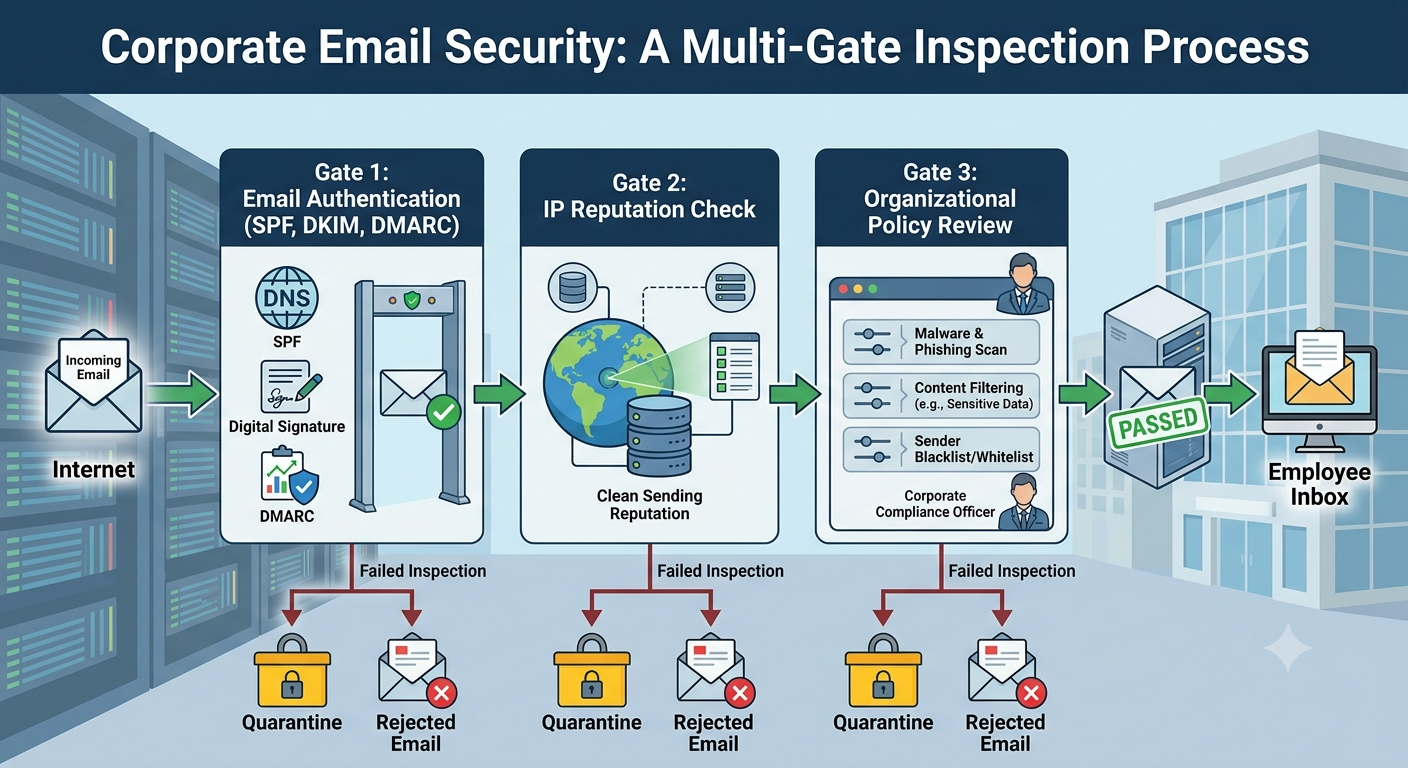
To understand the bounces, you have to understand what sits in front of a corporate inbox — because it isn’t Gmail’s algorithm.
Large organizations rarely expose their mailboxes directly to the internet. Instead they route inbound mail through a secure email gateway (SEG) — Mimecast, Proofpoint, Barracuda, or Cisco IronPort — that inspects every message before it reaches an employee. These gateways sit in the mail flow via the company’s MX records, and critically, they’re configured by the receiving organization’s IT and security team. You, the sender, have no visibility into their rules and no way to influence them.
That single fact changes everything. Consumer inboxes like Gmail are built around engagement: they watch whether recipients open, reply, archive, or report your mail, and they adjust. Enterprise gateways are built around security. They evaluate sender reputation history, authentication alignment, the reputation of every URL in your message, and the behavioral fingerprint of your sending infrastructure. They’re not asking “do people want this?” They’re asking “is this sender a threat?”
This maps cleanly onto a principle worth memorizing:
Authentication proves identity. Reputation proves trust. At an enterprise gateway, there’s a third gate: organizational policy — and you don’t control it.
Passing SPF, DKIM, and DMARC gets you through the first gate. A clean sending reputation gets you through the second. But a gateway can still reject or quarantine you on policy alone — because you’re an unknown sender, because your message carries a bulk fingerprint, or because a link in your signature points to a domain the gateway distrusts.
There’s one more mechanic that makes this problem so hard to diagnose. A gateway typically accepts your message at the SMTP level first — issuing the “250 OK” response your sending tool records as delivered — and only then applies its filtering, quietly quarantining or suppressing the message. Your dashboard says delivered. The recipient never sees it. This is the delivery-visibility gap, and it’s why “my deliverability is fine but I get zero enterprise replies” is such a common and maddening complaint.
Why Bounce Rates Climb With Company Size
Notice a pattern most cold senders feel but can’t explain: small companies are easy, big companies are a wall. That’s not your imagination, and it’s not about the quality of your pitch.
Small companies and startups usually sit on raw Google Workspace or Microsoft 365 with default filtering. Your mail is judged mostly on reputation and engagement — the game your tools are built for. Large companies layer a security gateway on top, and that gateway is explicitly designed to be suspicious of exactly the traffic pattern cold outreach produces.
Barracuda’s own documentation is instructive here. Its Email Gateway Defense applies rate control that limits how many connections a single IP can make in a 30-minute window, defers mail that shows “suspicious” patterns, and runs what it calls Predictive Sender Profiling to flag behavior typical of bulk senders. It also defers messages that share common subject lines across many recipients — forcing a retry and penalizing anything that looks like a blast.
Read that list again with a cold campaign in mind: high volume from one IP, identical subject lines across thousands of recipients, a brand-new sending relationship. That’s not an edge case the gateway occasionally catches. That’s a near-perfect description of a cold email campaign, and the 83% Barracuda bounce in the data above is the gateway doing precisely what it was built to do.
The larger the company, the more likely it runs one of these systems — which is why your bounce rate rises with the size of the logo you’re chasing.
Enterprise Deliverability Is Mostly Microsoft Deliverability
Here’s the piece that reframes the whole problem: for a huge share of your B2B targets, the “enterprise gateway” is Microsoft.
Industry estimates put Microsoft 365 at more than half of the enterprise email segment, with around three-quarters of the Fortune 500 running it as their primary productivity suite, and Exchange Online handling hundreds of billions of messages a month. Whatever the exact figures, the direction is clear: when you email a large company, the odds are high that your message hits Microsoft’s mail infrastructure — often with Microsoft Defender for Office 365 or a third-party SEG stacked in front of it.
That matters because Microsoft’s filtering has its own well-documented failure modes that have nothing to do with Gmail. The most punishing is an IP block: when one of your sending IPs lands on Microsoft’s internal block list, you’ll see rejections like 550 5.7.1 ... S3150, and the result is effectively 100% rejection to Outlook, Hotmail, Live, and any Microsoft-hosted corporate domain until you’re delisted. A perfectly warmed Gmail reputation does nothing for you here.
The practical implication: fixing enterprise deliverability often starts with fixing Microsoft deliverability specifically — getting blocked IPs delisted at Microsoft, and making sure Microsoft-bound mail is routed through clean IPs rather than blasted from a burned one.
How to Diagnose Where You’re Actually Failing
You can’t fix a problem a blended metric is hiding. The first move is always to break your delivery data apart by receiver.
Segment your bounce logs by recipient domain and mail system. Stop looking at one aggregate delivery rate. Group your results by receiving infrastructure — Gmail, Microsoft, Yahoo, and each corporate gateway — and you’ll usually find the failure is concentrated, not spread evenly. The br490 table above is exactly this exercise.
Identify which gateway each target uses. A quick MX lookup tells you what you’re up against:
dig +short MX targetcompany.com
*.mail.protection.outlook.com→ Microsoft 365 / Defender- records containing
mimecast→ Mimecast *.pphosted.comor*.ppe-hosted.com→ Proofpoint*.barracudanetworks.comor*.barracuda.com→ Barracuda
Now your “enterprise bounces” become specific and addressable instead of a mystery.
Seed-test the Big 3 and your key gateways before you send. Send to known inboxes at Gmail, Yahoo, and Outlook — and, where you can, seed addresses behind the corporate gateways your list targets — then check delivered-vs-bounced in your logs before the full campaign goes out. A seed test isn’t warmup, but it tells you whether a route is alive or dead before you spend your list on it.
Read the bounce category, not just the bounce. A reputation rejection, an authentication failure, and a policy deferral are three different problems with three different fixes. Parsing the actual DSN — the sending server, the status code, the diagnostic text — tells you which one you’re facing.
How to Fix Enterprise Email Deliverability
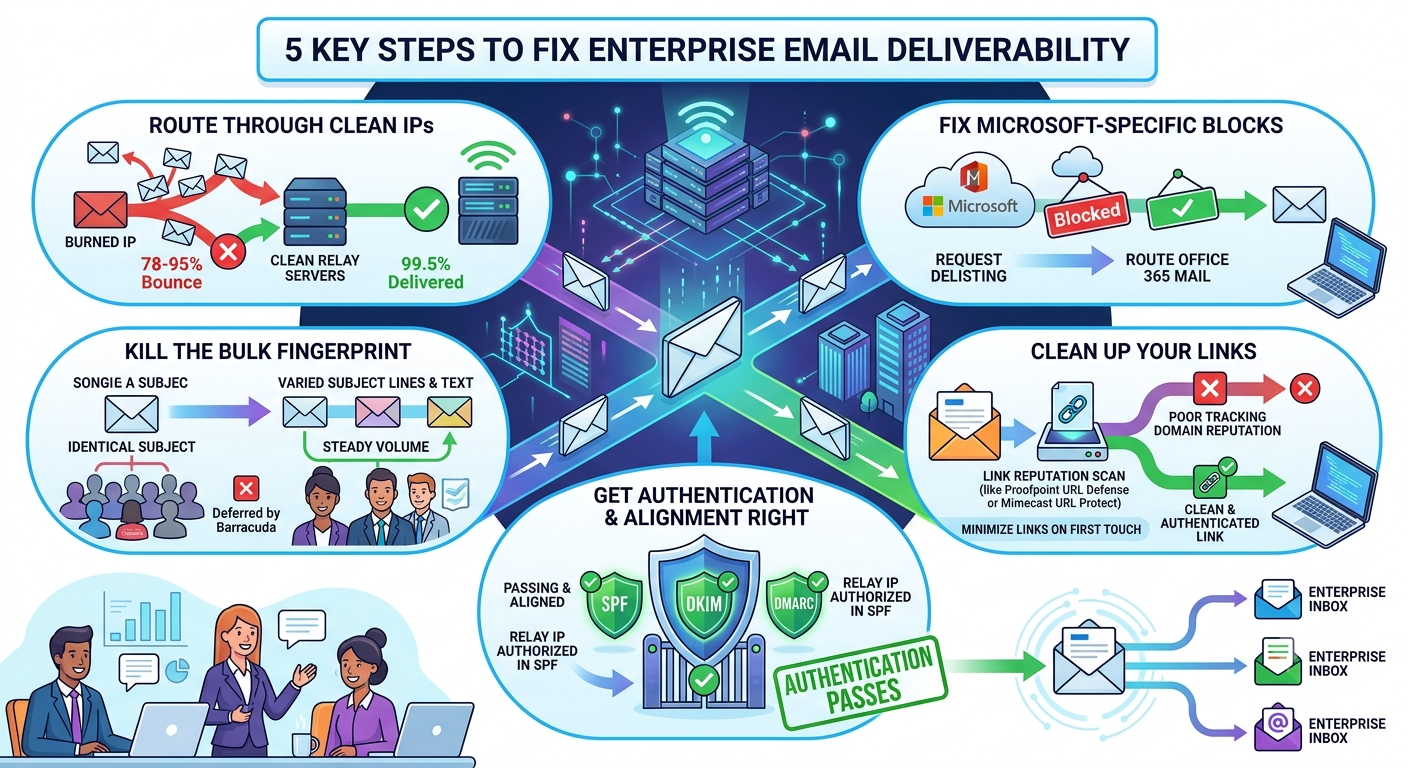
Route enterprise mail through clean IPs
The single biggest lever in the data above is routing. In that same window, Gmail traffic sent through clean relay IPs delivered 99.5%, while direct sends from burned IPs collapsed. This is the core of how BulkResponse handles the major ISPs: rather than sending direct from a user’s IP, mail is routed through clean relay servers with their own established reputation. Documented routed traffic has hit 0% bounce on the same routes where direct sending from a burned IP produced 78–95% bounce. If your enterprise mail is leaving from an IP with any history, routing it through a clean path is the highest-impact change you can make.
Fix Microsoft-specific blocks
If your diagnosis points at Microsoft-hosted domains, treat it as its own workstream: request delisting for any IP flagged with an S3150 block at Microsoft’s sender support, and route Office 365-bound mail through a clean relay rather than a listed IP. Because so much of the enterprise segment is Microsoft, this one fix can move a large chunk of your B2B list.
Kill the bulk fingerprint
Gateways defer and reject mail that looks mass-produced. Vary your subject lines instead of sending one identical line to thousands of recipients — remember that Barracuda specifically defers on common subject lines. Keep first-touch messages plain and human, hold volume steady rather than spiking, and avoid the patterns that scream “campaign” to a security filter.
Clean up your links
Enterprise gateways rewrite and reputation-check every URL in your message (Proofpoint URL Defense and Mimecast URL Protect do exactly this). A tracking or redirect domain with a poor reputation is a direct trigger for rejection — even when your sending domain is spotless. Make sure any tracking domain you use is itself clean and authenticated, and keep links to a minimum on the first touch.
Get authentication and alignment right
None of the above matters if you fail the first gate. Every sending domain needs SPF, DKIM, and DMARC passing and aligned — and if you send through a relay, the relay’s IP has to be authorized in your SPF, or the gateway will see an authentication failure at the final hop.
How to Prevent It Next Time
Enterprise deliverability isn’t a one-time fix; it’s a discipline. Build these into your process:
- Segment enterprise sends from consumer sends. Different receivers, different rules, different pacing. Don’t treat one blended list as if it behaves uniformly — it doesn’t.
- Monitor gateway-specific bounce rates, not a blended average. If Mimecast or Barracuda starts creeping up, you want to know in week one, not after the quarter’s pipeline is gone.
- Build trust through consistency. You can’t “warm up” a Proofpoint gateway the way you warm up Gmail — there’s no postmaster dashboard for it. What gateways reward is steady, consistent, well-authenticated sending over time. Sudden volume, new domains, and unwarmed audiences are exactly what they penalize.
- Seed-test after every routing or DNS change. One test per sending path. It’s the cheapest insurance you have.
The Takeaway
A great Gmail delivery rate tells you almost nothing about whether you’re reaching enterprise inboxes. Corporate mail sits behind security gateways that judge you on identity, reputation, and organizational policy — and they’ll accept your message at the door before quietly filtering it, so your dashboard lies to you by omission. The fix isn’t a magic setting; it’s segmenting your data by receiver, routing enterprise mail through clean IPs, handling Microsoft as its own problem, and stripping the bulk fingerprint that security filters are built to catch.
Frequently Asked Questions
Why do my cold emails deliver to Gmail but bounce at big companies? Because large companies route inbound mail through security gateways (Mimecast, Proofpoint, Barracuda) that evaluate you on security posture and organizational policy, not the engagement signals Gmail uses. The same message that satisfies Gmail can be quarantined or rejected by a gateway configured by the recipient’s IT team.
My tool says the email was delivered — how can it be bouncing? Enterprise gateways often accept a message at the SMTP level (logged as “delivered”) and then quarantine or suppress it based on their own analysis. This “delivery-visibility gap” means your dashboard can show delivery while the recipient never sees the mail.
How do I know which gateway a company uses?
Run an MX lookup: dig +short MX company.com. Records pointing to mail.protection.outlook.com mean Microsoft 365; mimecast, pphosted.com (Proofpoint), or barracuda in the records identify the gateway in front of the inbox.
Does warming up my domain fix enterprise deliverability? Warmup helps, but you can’t warm up a corporate gateway the way you warm up Gmail — there’s no postmaster tool for Proofpoint or Mimecast. Gateways reward consistent, authenticated sending over time and penalize volume spikes, new domains, and unwarmed audiences.
Why is Microsoft so important for B2B cold email? Industry estimates put Microsoft 365 at more than half of the enterprise email segment, with around three-quarters of the Fortune 500 running it. For most enterprise targets, reaching the inbox means passing Microsoft’s filtering — which has its own block lists (like S3150) that a strong Gmail reputation won’t help with.